
Use case driven console
Transforming the Amazon Personalize console into an intuitive, personalized journey, this feature guides users through tailored workflows aligned with their specific use cases and real-world goals. By prioritizing the user's end goal and providing hyper-contextual guidance, it addressed current challenges, and fostered a more cohesive experience for diverse personas.
Role: UX Designer II
Location: Amazon Web Services
Duration: December 2023 to July 2024
Tools: Figma, Usertesting, Quip
Background
Amazon Personalize is a machine learning service that allows developers to build personalized recommendation solutions without the need for extensive machine learning expertise. It offers a range of model algorithms or “recipes” for different use cases, such as product recommendations, user segmentation, and personalized content ranking. Amazon Personalize leverages advanced machine learning algorithms and provides a scalable infrastructure to deliver real-time personalized experiences to customers.
Problem Description
Despite its robust capabilities, the Amazon Personalize console faced significant challenges with low visit and adoption numbers, coupled with poor engagement metrics. Key issues included:
Low adoption and engagement: Users struggled with the console's information architecture and overall user experience, leading to low visit rates and poor engagement.
User feedback and complaints: Users highlighted the console's complexity, confusing workflow, and lack of guidance, signaling the need for a more user-friendly interface.
Usability behavior analytics: Data revealed friction points, high drop-off rates, and areas of confusion within the console's workflow, indicating a need for a more intuitive and guided experience.
These issues demonstrated that the Amazon Personalize console required significant improvements to provide a cohesive, intuitive, and tailored experience that catered to diverse user groups and their specific use cases.
Design Process
In UX design, there's no one-size-fits-all approach, and in this particular case, I didn't adhere strictly to a textbook double diamond process. Taking initiative in this project required a high degree of collaboration.
I conducted a comprehensive analysis to identify user challenges, leveraging these insights to craft multiple solution proposals aimed at securing stakeholder buy-in. Using various frameworks, I ensured alignment of the solutions with both user needs and business objectives. Throughout the process, I facilitated workshops and maintained frequent check-ins to gather diverse perspectives and integrate feedback from stakeholders effectively.
Research
I conducted an end-to-end audit of the system, analyzed customer tickets, and engaged with Solution Architects (SAs) to understand user challenges. Using this feedback, I mapped user journeys for both the current solution and a potential improvement based on identified gaps.
1. End-to-end audit
I performed a comprehensive audit of the current service, organizing it into a flat tree structure to visualize the information architecture in a 2D space. This approach facilitated clearer conversations with stakeholders and uncovered numerous UI bugs, which potentially contributed to lower engagement metrics.
1. Proto-Personas
I facilitated workshops about a year prior to this work to create proto-personas representing diverse user groups of the service. I revisited this data to validate if it still held true and ensured the team's understanding of our target personas remained accurate.
2. Studying customer data
I reviewed all the UI related customer tickets and user behavior data. By categorizing and prioritizing the identified issues, I identified root causes and areas of improvement. This analysis also helped to get insights into the friction points within the service and identify user drop-off points.
3. Collaborating with SAs
I interviewed Solution Architects to leverage their field expertise with customers. This revealed discrepancies between how they were positioning the workflow to users and the actual console workflow, as well as inconsistencies in the documentation.
Analysis
Using the insights from the research, I cross-referenced them with existing knowledge and new knowledge gathered by conducting working multiple sessions.
2. User Journey Mapping
I mapped the current user journeys based on how the service was laid out and how users interacted with it, supported by backend data analysis. Additionally, I created a user journey map reflecting how Solution Architects guided customers through the product. This comparison revealed clear discrepancies and areas for improvement.
3. Jobs-to-be-Done (JTBD)
To align our solution with user needs and business goals, I employed the Jobs-to-be-Done framework. I identified key jobs different personas were trying to accomplish with the service and analyzed their success metrics.
Key problems to solve
After collating all the insights from the research and analysis, I derived at the following as the root cause of the low engagement numbers:
Counterintuitive setup: Users often struggled with understanding how to set up their use cases due to the lack of clear guidance and an overwhelming amount of options from the start. This was evident from the user journey maps and feedback from Solution Architects, which highlighted discrepancies between how users approached the service versus how it was designed on the console.
Inconsistent guidance: Analysis of customer tickets and interviews with Solution Architects revealed that users received inconsistent guidance from different sources. The documentation and the actual console workflow did not always align, leading to confusion and inefficiencies.
Under par visual interface: Extensive UI bugs were observed across critical user flows, leading to significant friction in tasks. Users encountered frequent visual glitches and inconsistencies that disrupted their workflow and contributed to a frustrating experience.
Over-reliance on documentation: Users frequently relied on external documentation to understand how to proceed with their tasks, as noted in customer tickets and user feedback. This reliance indicated that the console lacked sufficient in-context guidance, making it harder for users to navigate the service effectively.
Sampled screenshots from the existing experience:
Use Case First, Datasets Later
The solution designed streamlines the user experience by having users select their desired use case at the very beginning of their interaction with the console. The approach aims to simplify the initial setup process and reduce user confusion by providing a clear, goal-oriented starting point. Once the use case is chosen, the console dynamically adjusts to offer hyper-contextual guidance tailored to the specific needs of that use case. This includes recommendations for dataset imports, required columns, insights, filters, and metrics, ensuring that users are guided through a customized, intuitive workflow. By aligning the user journey with the specific goals from the outset, this solution also reduces the learning curve significantly.
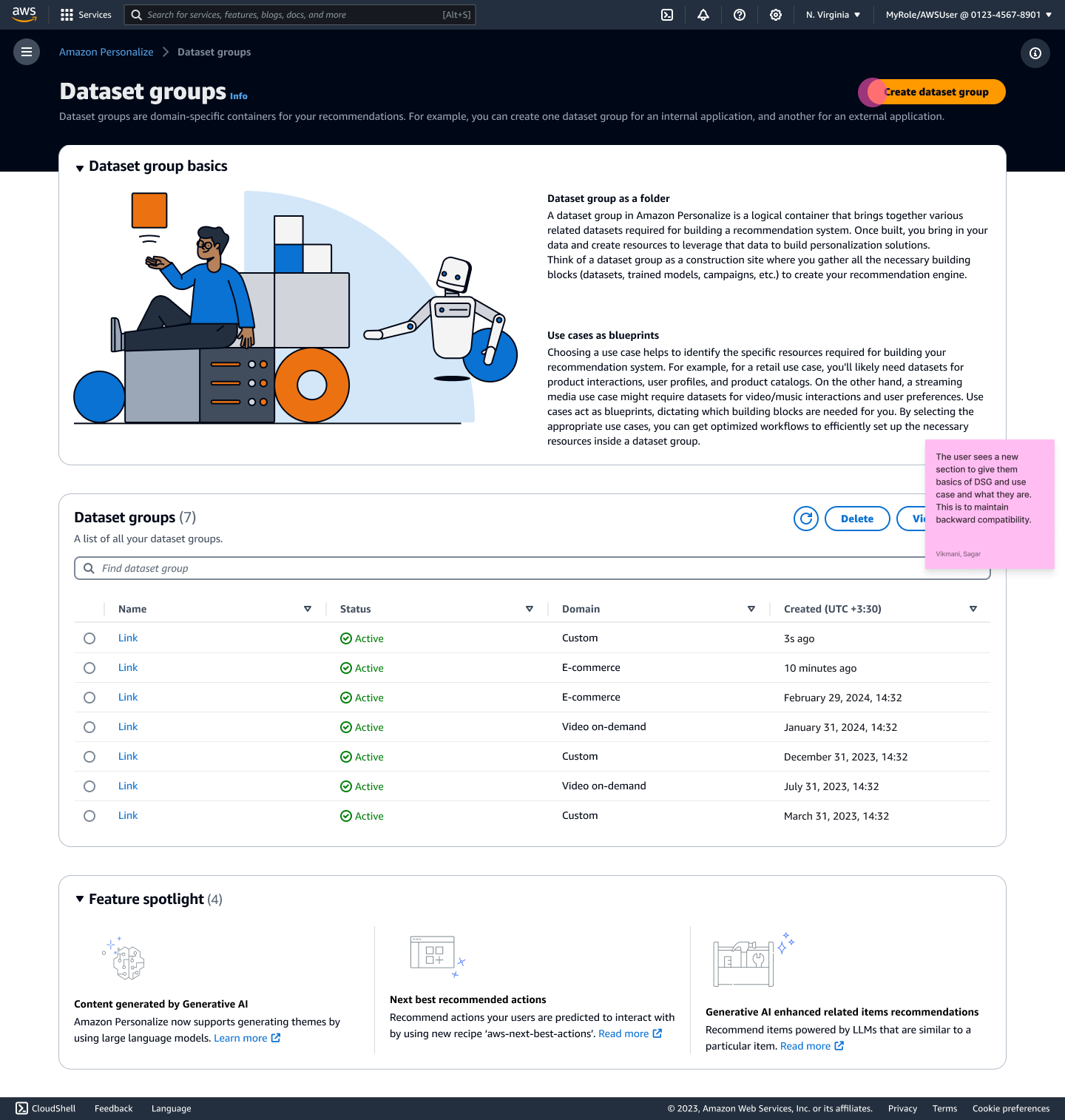
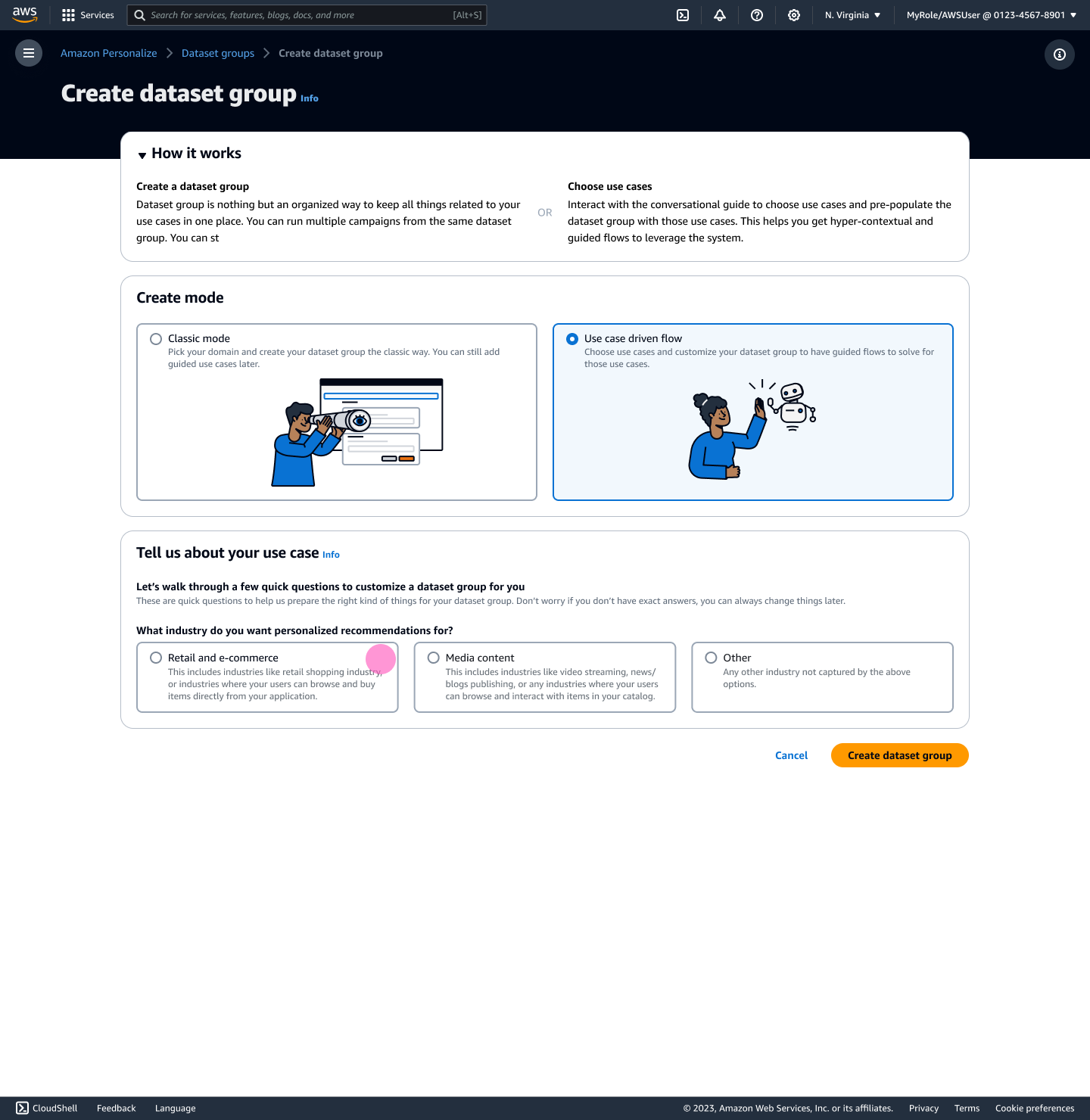
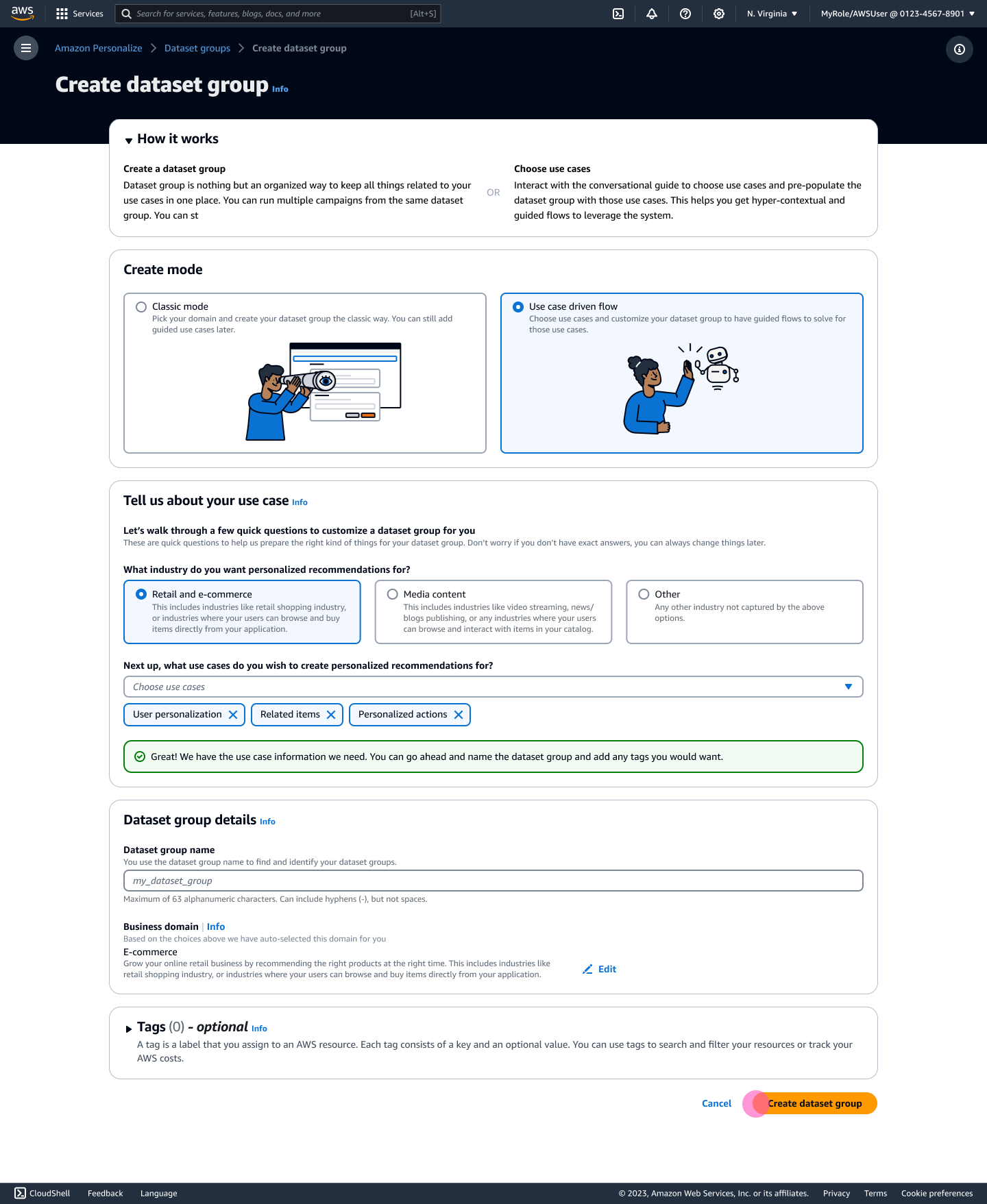
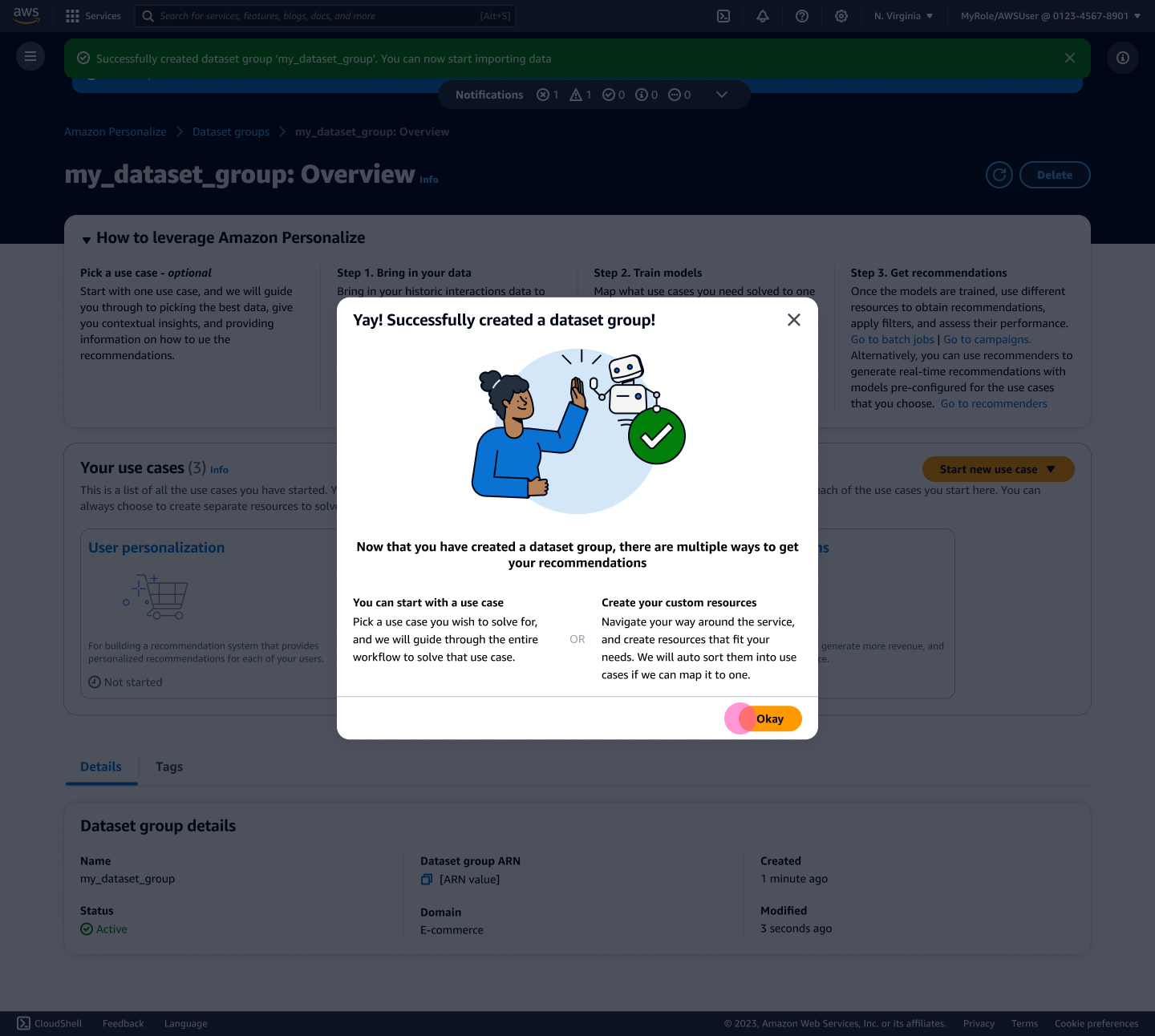
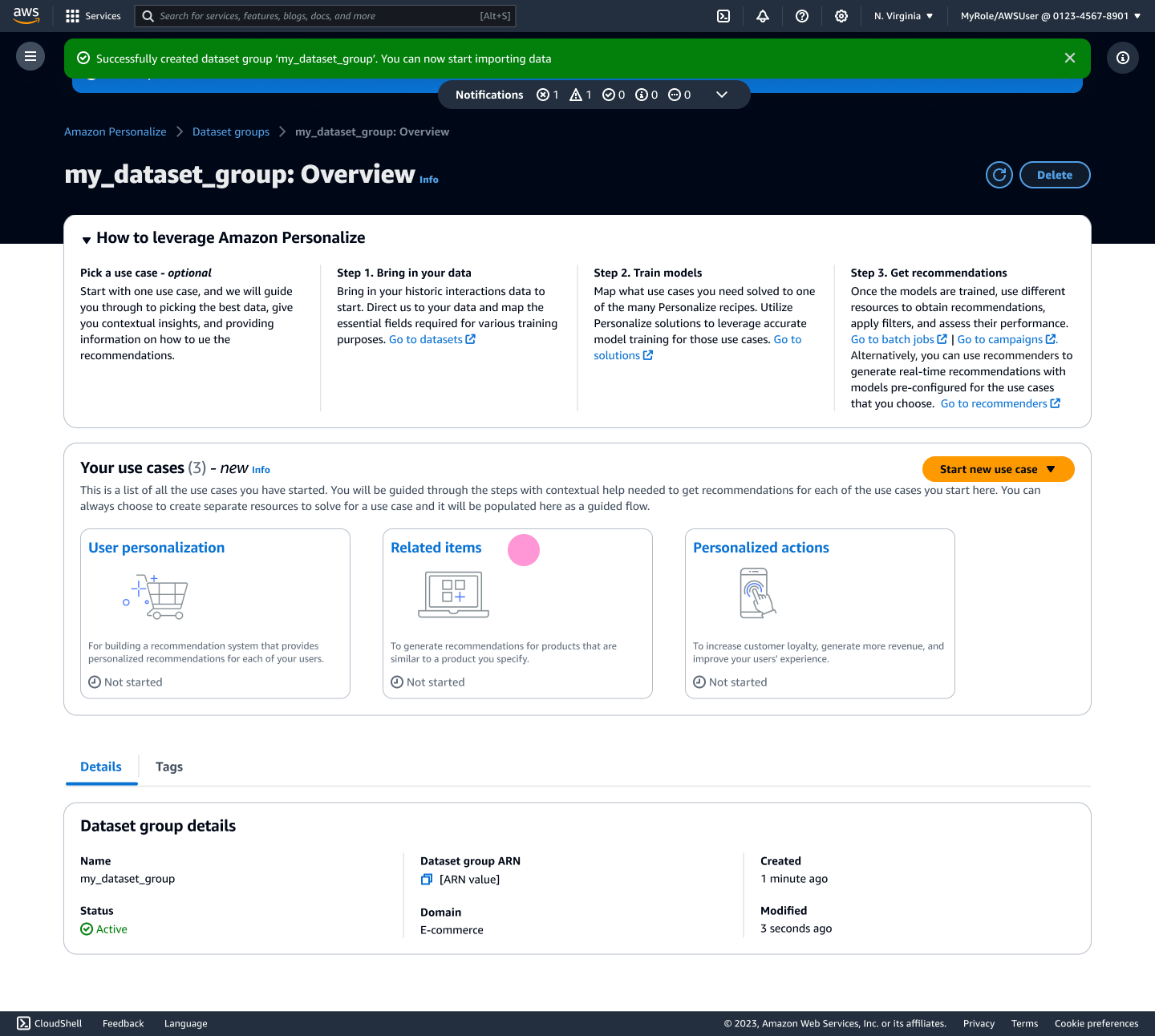
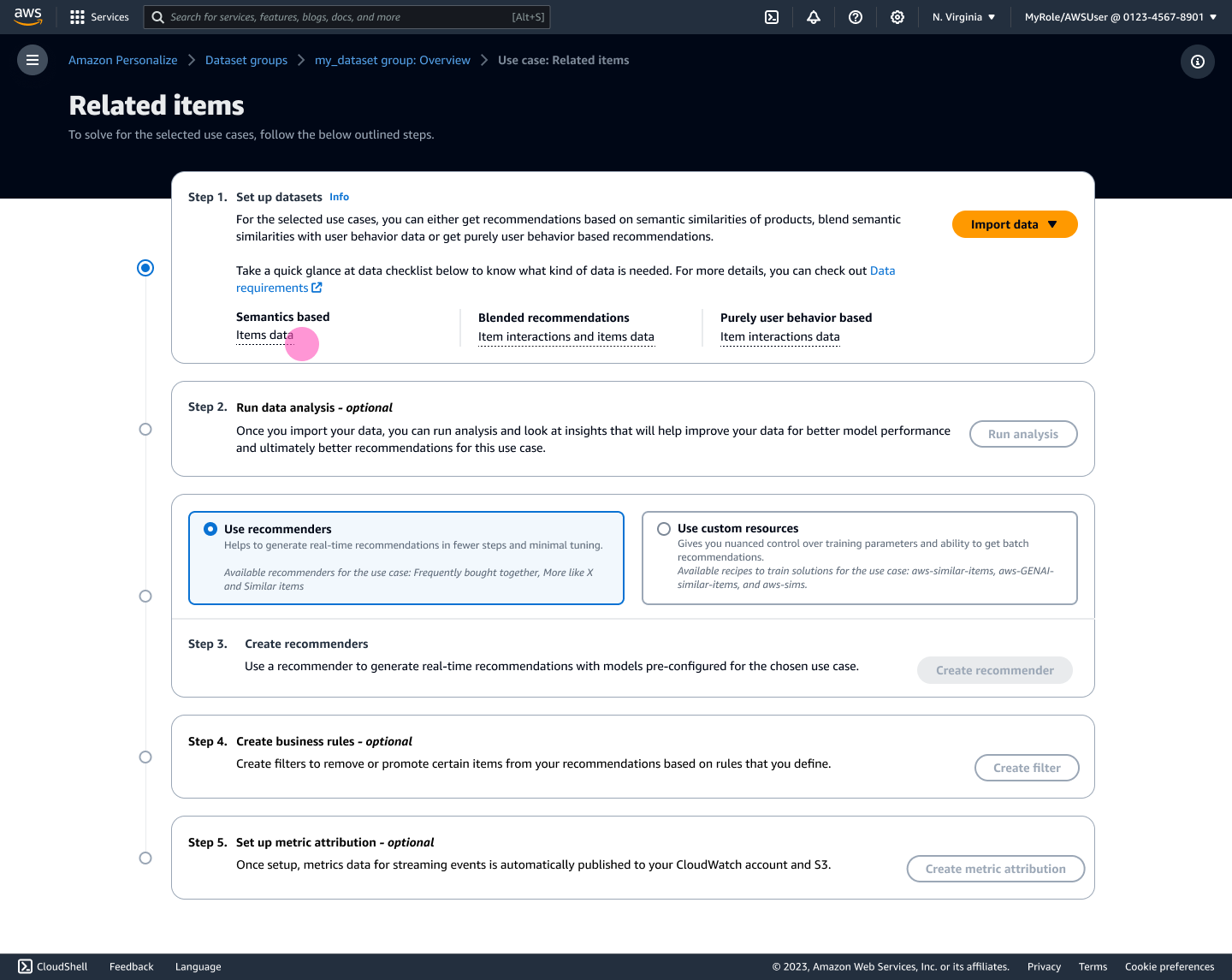
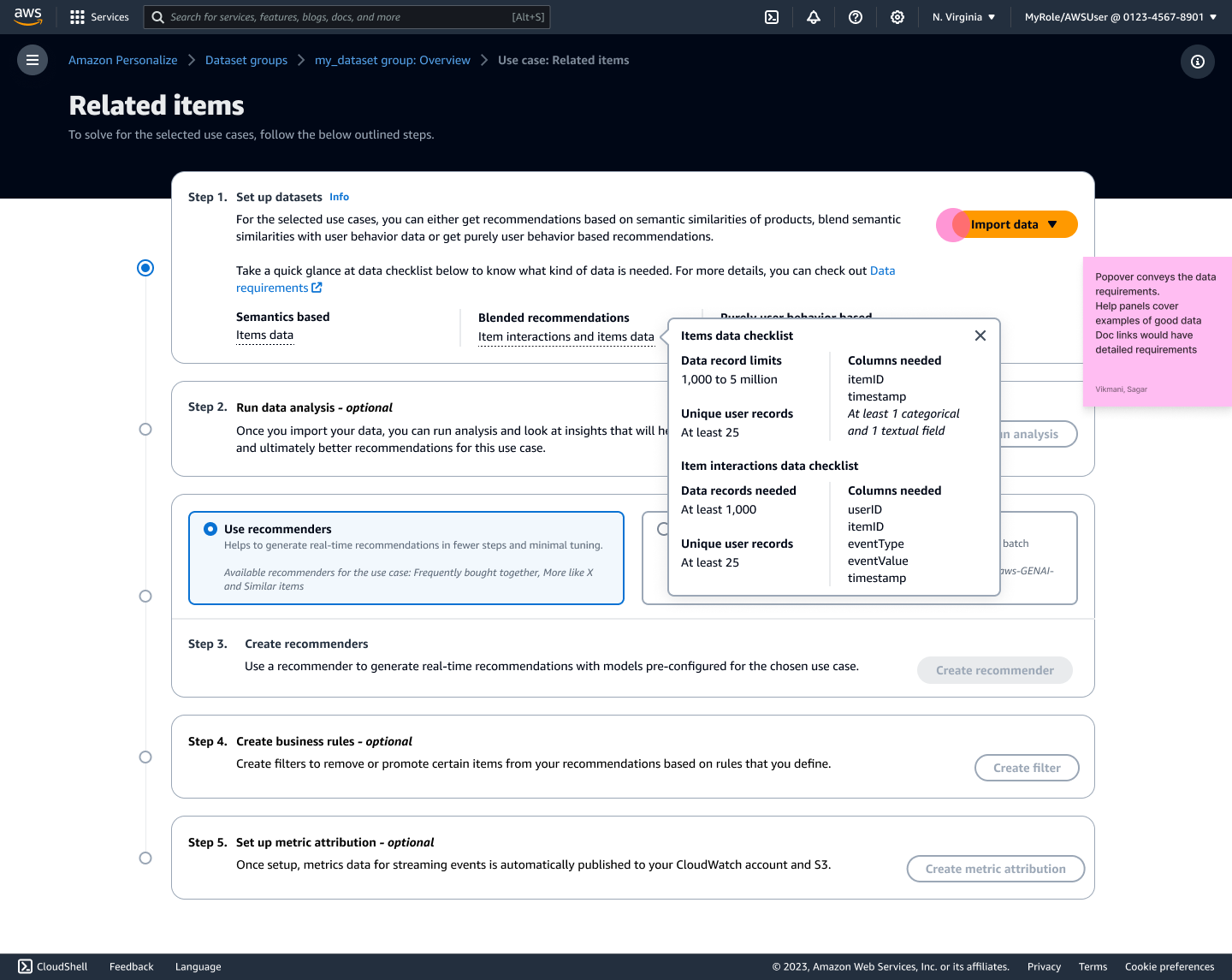
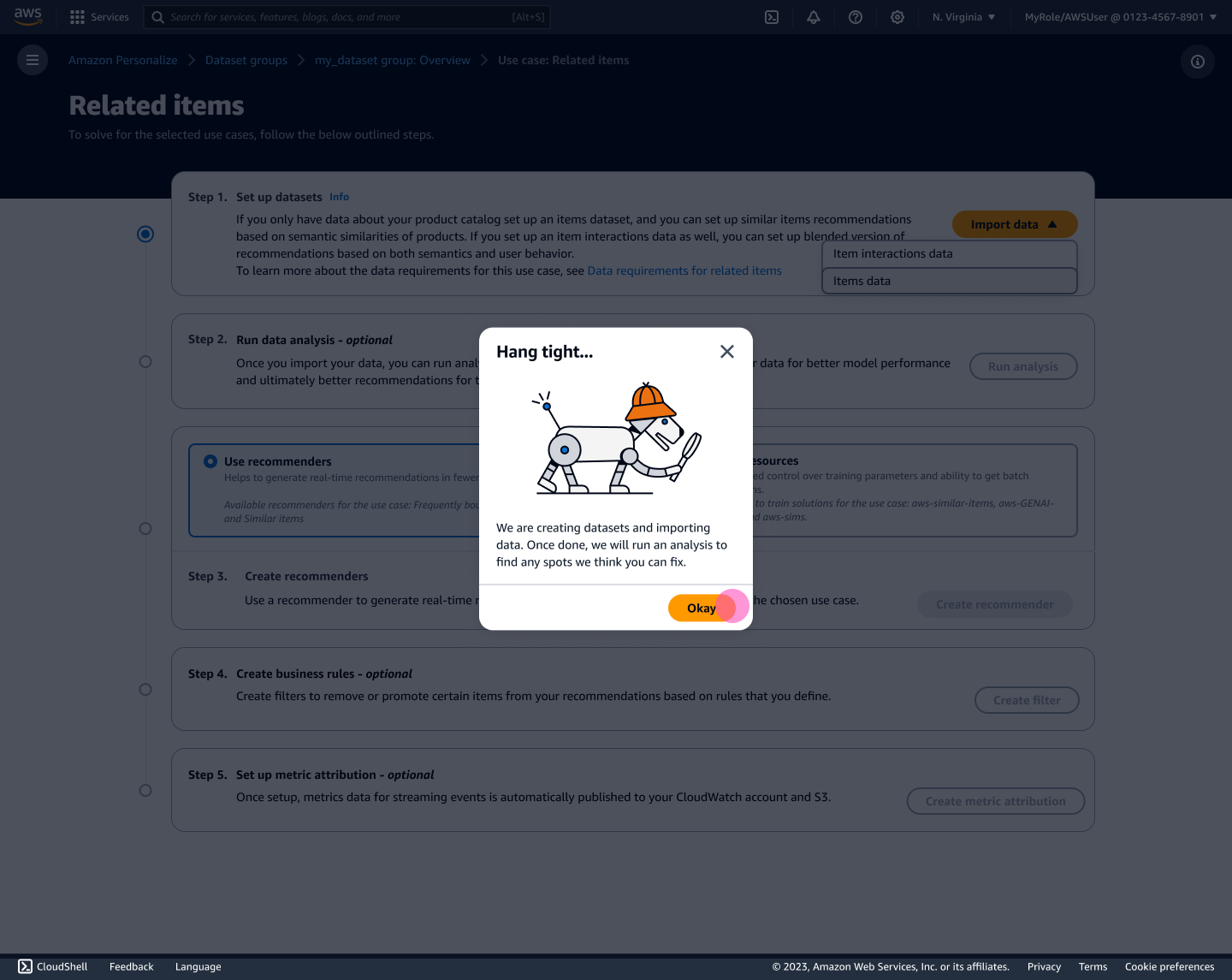
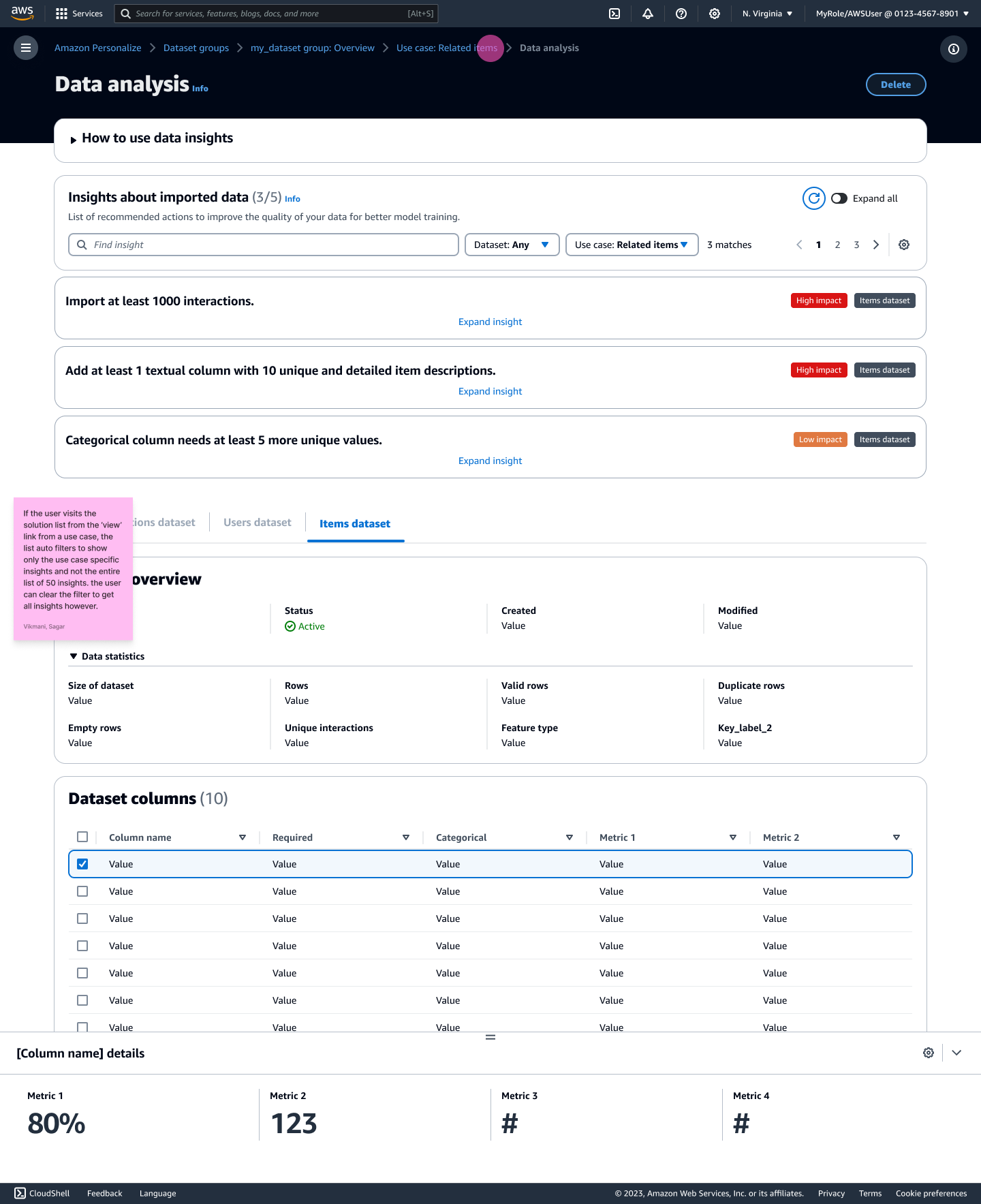
Key aspects of this solution:
Hyper-Contextual Resource Creation: Providing contextual guidance based on the selected use case helps mitigate inconsistent guidance issues. Recommendations for specific dataset imports, required columns, insights, filters, and metrics ensure users have a tailored experience, reducing the learning curve and improving task completion rates.
Persona-Agnostic Experience: Tailoring the console experience to specific use cases rather than user personas accommodates a broader range of users, including non-technical users. This inclusivity helps address the varied skill levels and backgrounds of the user base, making the service more accessible.
Reduced Reliance on Documentation: Offering in-UI guidance and context directly within the console reduces users' reliance on external documentation. This integrated approach helps users find the information they need more easily, leading to a smoother and more efficient user experience.
Consensus Building and Buy-In
To build consensus and gain buy-in, I organized cross-team presentations and collaborative discussions, highlighting the potential benefits and outlining a continuous feedback plan.
Preempting pushback from the engineering team, I prepared multiple proposal versions:
Version 1: Complete Overhaul
Transform the console into a fully use-case-driven platform, restructuring the entire user experience around specific use cases.
Version 2: Use-Case Layer on Existing Flow
Introduce a use-case layer on top of the existing "guided stepper" flow, providing an overlay of use-case-driven guidance without overhauling the core structure.
Version 3: Phased implementation
Implemented use-case-driven elements incrementally, starting with new GenAI recipes and positioning them as the primary focus. If successful, other use cases would be updated accordingly.
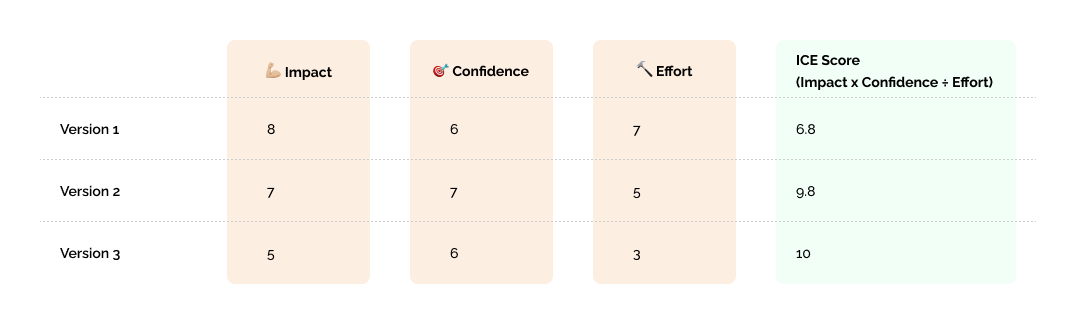
ICE Scoring for prioritization
To help prioritize and pitch for different version in an objective manner I needed a way to quantify the proposals somehow. This is where a heuristic evaluation method becomes useful.
Impact, Confidence, and Effort scoring: This structured approach enabled us to focus on a version likely to deliver the most value with the least effort, ensuring that resources are allocated strategically. By systematically assessing ideas through the lenses of impact, confidence, and ease, the framework facilitated a more objective and data-driven approach.
Impact: The potential effect on achieving the desired outcome. To determine this, I collaborated with the Product team to arrive at a score.
Confidence: The level of certainty that the impact will be achieved. I worked with the SA team to validate the impact score, ensuring that our estimates were realistic and achievable.
Effort: The effort required to implement the improvement. I partnered with the engineering team to assess the technical feasibility and assign a score.
Proposed KPI benefits
To help sell the idea better, I worked with internal teams to come up with best-guess KPIs for the ideal version. These helped to bolster the impact of the proposed changes, facilitating smoother buy-in from stakeholders to allocate resources to work on changes.
Reduced Customer Tickets:
Achieve a 40% reduction in usability and workflow-related tickets by improving the user experience and providing better in-UI guidance.
Close out 20 current backlogged UX tickets, addressing long-standing user pain points and streamlining support efforts.
Increased User Engagement:
Target a 25% growth in monthly active users (MAU) by making the console more intuitive, accessible, and user-friendly through the proposed changes.
This structured approach facilitated the successful adoption and prioritization of the use-case-driven console experience within the engineering roadmap.
Based on the ICE scores, Version 2 achieved the highest score of 9.8, signifying a strong balance between high impact and confidence along with a manageable ease of implementation. This version also strategically aligned well with the product team's vision and objectives. Given these factors, alongside informed projections of improved KPIs, Version 2 garnered unanimous agreement across all teams to proceed with its development and implementation. This consensus was crucial in prioritizing resources and efforts towards Version 2 to capitalize on its anticipated benefits effectively.
Beta Implementation
After securing buy-in from key stakeholders for Version 2 of the use-case-driven console, we embarked on the beta implementation phase. This version integrated a use-case layer on top of the existing "guided stepper" flow, ensuring a gradual transition that minimized resistance while maximizing adoption.
To ensure a successful beta launch, we collaborated closely with multiple teams:
Product Team: Worked together to refine the use-case-driven elements, ensuring alignment with user needs and business goals.
Engineering Team: Partnered to integrate the new features seamlessly into the existing console, focusing on robustness and scalability.
Solution Architects: Engaged with SAs to validate the new workflow and gather preliminary feedback, ensuring the new approach would meet customer expectations.
The beta phase officially began in March 2024 🎉, with a clear roadmap towards General Availability (GA) scheduled for September 2024.
Beta pulse check
During the beta phase of the use-case-driven approach for the Amazon Personalize console, we collected and analyzed various metrics to evaluate its impact on user experience. The results indicated significant improvements, both quantitatively and qualitatively.
Quantitative Metrics
Customer Satisfaction (CSAT) Scores: There was a notable increase in CSAT scores, rising from 3.8 to 4.6 out of 5. This improvement highlights the enhanced user experience and overall satisfaction with the new approach.
Faster Time-to-Value: The time it took for users to achieve their desired outcomes was reduced by 28%, demonstrating the efficiency and effectiveness of the streamlined console.
Qualitative Feedback
Solution Architect Testimonials: Solution Architects (SAs) praised the new approach, particularly the streamlined onboarding process. They noted that the use-case-driven design made it easier for them to guide customers through the setup and implementation of personalization features.
Positive Feedback from Non-Technical Users: Marketers and business decision-makers, who often have less technical expertise, found the console significantly more accessible and intuitive. This inclusivity has broadened the user base and empowered non-technical users to leverage personalization capabilities effectively.
The beta phase clearly demonstrated that the use-case-driven approach fosters a more inclusive and user-friendly ecosystem